The CRM you configure, not the one you work around.
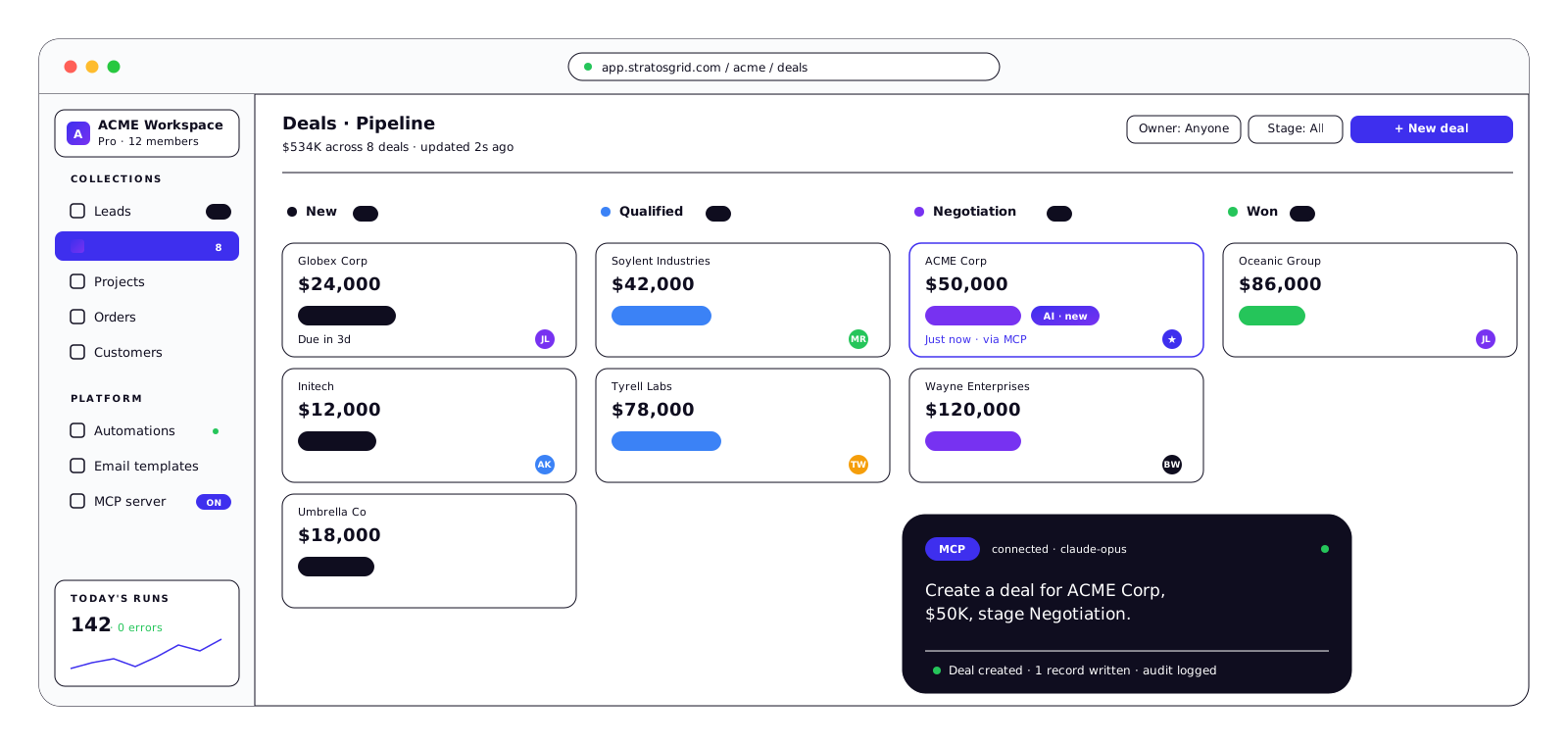
Install a pre-built blueprint in five minutes. Reshape any field, pipeline, or workflow — without code. Built on the same platform as your content and email, so everything connects.
🇪🇺 EU-hosted · GDPR-compliant · No credit card required
At a glance
Six things that make this different
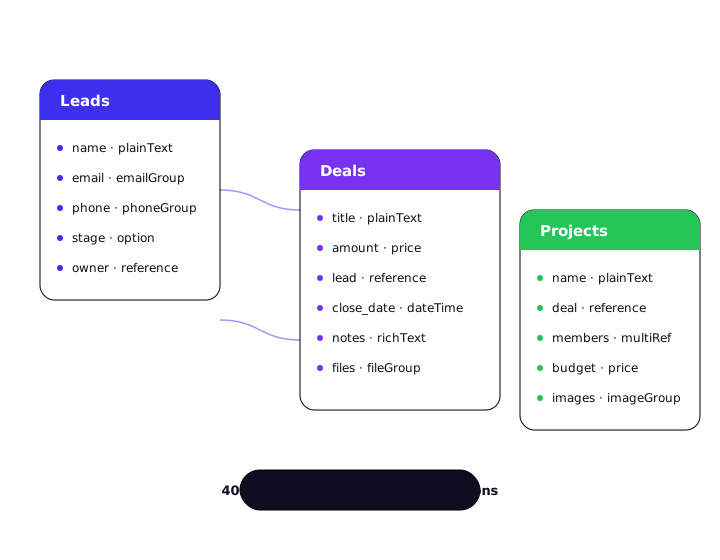
Flexible data model
Collections, fields, filters — define what you track.
Lifecycle-driven pipelines
Not just statuses — real stage logic with transition rules.
Email marketing built-in
Rate-limited, warmup-aware, deliverability-safe.
Visual automations
Triggers, conditions, follow-ups, branches — no code.
Install in one click
Pre-built blueprints for your industry.
Provider-agnostic
Gmail today, Outlook next, your SMTP later.
One platform. Infinite fit.
Most CRMs let you rename a field. StratosGrid lets you define the collection. Leads, deals, projects, orders, tickets, listings — model whatever your business actually runs on, with 40+ field types, filters, and lifecycle stages that enforce real transition rules.
The same platform powers your content, your email, and your automations — so a lead submitted on your site flows straight into a pipeline, a campaign's reply lands on the right deal, and a blueprint export captures the whole thing in a single file you can reuse.
Everything you need, configured your way
Four capabilities that most CRMs sell separately — combined into one coherent platform, each with the depth of a dedicated tool.
Every contact, in context. Every stage, with logic.
StratosGrid doesn't ship a fixed "Lead" or "Customer" object. You define what a lead is for your business — what fields matter, which stages it moves through, when it becomes a customer. And unlike CRMs where "status" is just a label, lifecycle stages here are a real state machine with categories, transition rules, and automation triggers.
Custom collections and fields — 20+ field types including text, rich text, references between collections, addresses, phone groups, arrays of nested objects.
Lifecycle states — open / closed / archived categories, colors, ordering, transition-triggered automations.
Saved filters — reusable across campaigns, reports, and automations — define a segment once, use it everywhere.
Full history — every field change, campaign touch, reply, and manual note on every entry.
Marketing email that doesn't burn your domain.
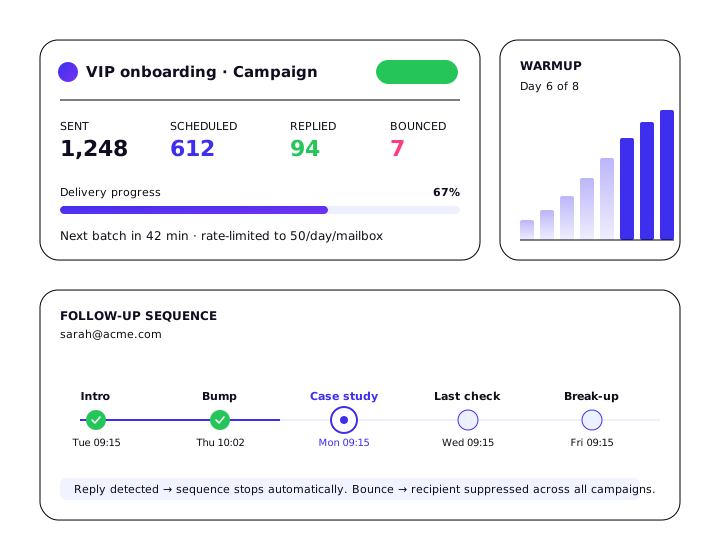
Most "CRM with email" products route every send through one API call and hope for the best. We built the sending layer that experienced cold-outreach teams pay for separately — rolling 24-hour caps, warmup ramps, mailbox rotation, reply detection, automatic pause on bounce spikes. Fully configured before your first send.
Rate-limited sending — per-campaign daily caps, rolling 24-hour windows matching Gmail's own enforcement.
Warmup mode — start a new mailbox at 10/day, ramp to 50/day over ~8 days, automatic.
Follow-up sequences — scheduled as persistent rows — cancel per-recipient, see the pipeline days out.
Reply & bounce detection — inbound polling stops sequences automatically for replied or bounced recipients.
Logic that touches every part of your CRM.
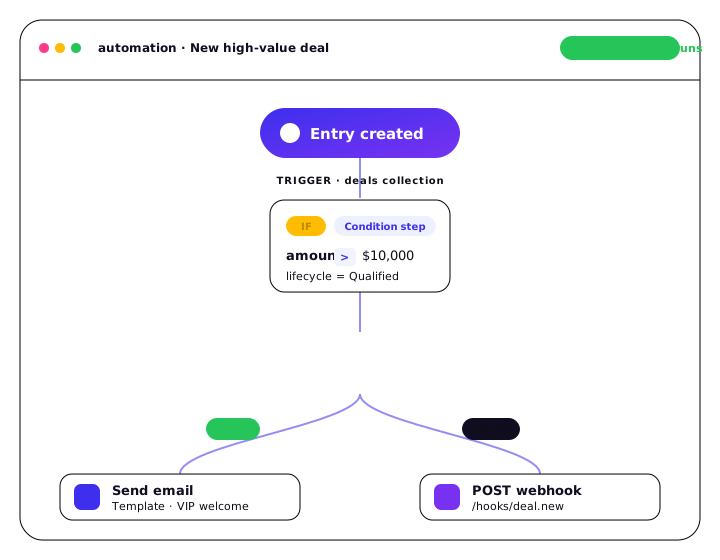
Because the CRM lives inside our broader platform, automations aren't limited to "send email when status changes." They can create entries, update fields, call webhooks, run sub-automations, loop over results, and branch on conditions — all without code. Most CRMs give you a linear sequence builder. We give you an execution engine.
Merge tags — in every step, resolving to live collection data at runtime.
Dry-run and replay — test an automation before activating; replay any historical run with step-by-step logs.
Reshape the CRM without asking engineering.
Every visible piece of the platform is config. Fields, groups, layouts, colors, lifecycle states, filters — add, reorder, change, remove. No code. No vendor tickets. No waiting for the next release cycle.
Layouts — on a 12-column grid — drag field groups into rows, split rows into columns, hide technical fields by default.
Field groups — organize detail pages and forms — one structure drives both views.
Field rules — conditional visibility — show "cancellation reason" only when status is Churned.
Per-collection views — list views, kanban boards, saved segments — every collection gets its own.
Email infrastructure built for serious senders
Most CRM email modules break when you scale past a hundred recipients. We built the sending layer that cold-outreach teams usually pay $200/month to add — into the box.
Sending rate control
Rolling 24-hour caps match Gmail and Workspace limits. Pool mailboxes under tags, rotate round-robin, each with its own daily cap. A 10,000-recipient campaign stretches across weeks automatically — no bursts.
Warmup mode
New mailbox? Start at 10 sends/day, increment 5/day, reach ceiling in ~8 days. No manual adjustment, no forgotten caps. Based on industry-standard cold-outreach warmup curves.
Follow-ups as persistent rows
Each scheduled send is a stored record with a timestamp and state. Cancel individuals without breaking the sequence. See the full pipeline days out. Resume after a pause without losing schedule.
Deliverability signals
We poll inboxes — replies stop sequences, bounces go to suppression. Connect Google Postmaster Tools to surface spam rate and authentication status in your CRM. Auto-pause when signals cross thresholds.
Sizing guidance: 25–50 emails/day per mailbox is the cold-outreach safe range. Warm audiences and transactional sends can go higher. Use mailbox pools to scale horizontally.
Install the B2B Sales blueprint. Start sending the same hour.
Import your contacts, keep your fields, ship your first campaign before lunch.
A blueprint is a full CRM setup in a single file — collections, lifecycles, automations, email templates, example data. Install in one click. Customize everything after. Export your own version when you're ready to share it with your team.
🎯
B2B Sales CRM
Available
Leads, customers, deals, team members. Five-stage lifecycle (New → Contacted → Qualified → Converted → Disqualified). Automatic Lead → Customer conversion when lifecycle transitions to Converted. Preloaded saved filters for "Hot leads", "Stuck in Qualified >14 days", "Converted this month". Email sequences with rate limiting and warmup configured out of the box.
Author blueprints for your industry and export them for reuse.
See docs
Available — ready to install today. In development — shipping in the next 1–2 quarters. Planned — on the roadmap, no committed date.
Why we built this
I spent years watching teams buy a CRM, spend a quarter configuring it, and then quietly work around it in spreadsheets because the field they needed wasn't configurable and the field they didn't need was mandatory.
StratosGrid is the CRM I wanted to use — one where the data model is yours, the email engine is production-grade out of the box, and a blueprint can capture your industry's setup so the next team doesn't start from zero.
We publish our roadmap, we don't fake testimonials, and we won't gate core features behind "contact sales". If that sounds like your kind of tool, install a blueprint and see for yourself.
Founder
Built now · shipping next · planned later
We show our roadmap. Plans change, dates slip — but the direction is stable.
NowShipped and in production
Rate-limited email sending
Campaign tracking collection
B2B Sales, Email Marketing, Content blueprints
Gmail / Google Workspace provider
NextThrough 2H 2026
Reply & bounce detection
Warmup mode and ramp-up caps
Mailbox pools with rotation
Email verification (MX + disposable blacklist)
Google Postmaster Tools connector
Later2027 and beyond
Outlook / Microsoft 365 provider
Custom SMTP connector
SMS sending
Community blueprint marketplace
SSO / SCIM for enterprise
Frequently asked questions
How is this different from HubSpot, Close, or Pipedrive?
Those tools ship a packaged sales CRM and let you rename fields. StratosGrid ships a platform: you define the collections, the lifecycle stages, and the transition rules. You get a B2B Sales blueprint that matches what those tools give you on day one — and the freedom to reshape every part of it without code.
What does "built-in email marketing" actually mean?
Rate-limited sending with per-mailbox daily caps, warmup mode that ramps volume over weeks, follow-ups that live as persistent rows on the contact (not buried inside a sequence), and deliverability signals from Postmaster Tools when you connect them. No separate Mailchimp, no separate outbound tool — it's the same platform as your CRM.
What volumes are realistic?
Sizing guidance: 25–50 emails/day per mailbox while warming, up to a few hundred per day on established mailboxes. Use mailbox pools with rotation once we ship them (on the "Next" roadmap) to scale beyond a single mailbox. This is not a broadcast platform — it's built for teams sending tens to low thousands of outbound emails per day, safely.
Can I migrate from my current CRM?
Yes. Export your contacts and deals from your current tool (CSV or native export), install the B2B Sales blueprint, and map fields during import. If your setup has custom fields, add them to the collection first — you're not forced to retrofit your data into someone else's schema.
Do you support Outlook or my own SMTP?
Gmail / Google Workspace today. Outlook / Microsoft 365 and custom SMTP are on the roadmap — see the Roadmap section above for the current window. We'll add them; we don't hide "coming soon" behind a paywall.
Can I export my data?
Yes — any collection, any time, as CSV or JSON. Blueprints themselves are a full export format: collections, lifecycles, automations, email templates, example data, all in one file. Your setup is portable.
Is there a public API? What about MCP?
Yes to both. The backend exposes a full REST API covering every UI operation, with OAuth2 authentication. Every workspace also exposes a Model Context Protocol server — connect it to Claude, Cursor, or any MCP-compatible assistant and it can query and modify your CRM by voice or chat. MCP is a feature, not the positioning.
Stop bending your process around someone else's CRM
Install the B2B Sales blueprint in five minutes. Import your contacts. Start working by the end of the hour.